Human Intelligence Wins: Why Timestripe Outsmarts Motion's AI
Both Timestripe and Motion help you organize your day, but they approach productivity from very different angles. Timestripe emphasizes long-term clarity and structured planning, connecting everyday tasks to your bigger goals. Motion, on the other hand, is built around AI-powered scheduling that automatically arranges your day for maximum efficiency. Here’s a breakdown to help you choose the tool that fits your workflow best.
Overview
Timestripe
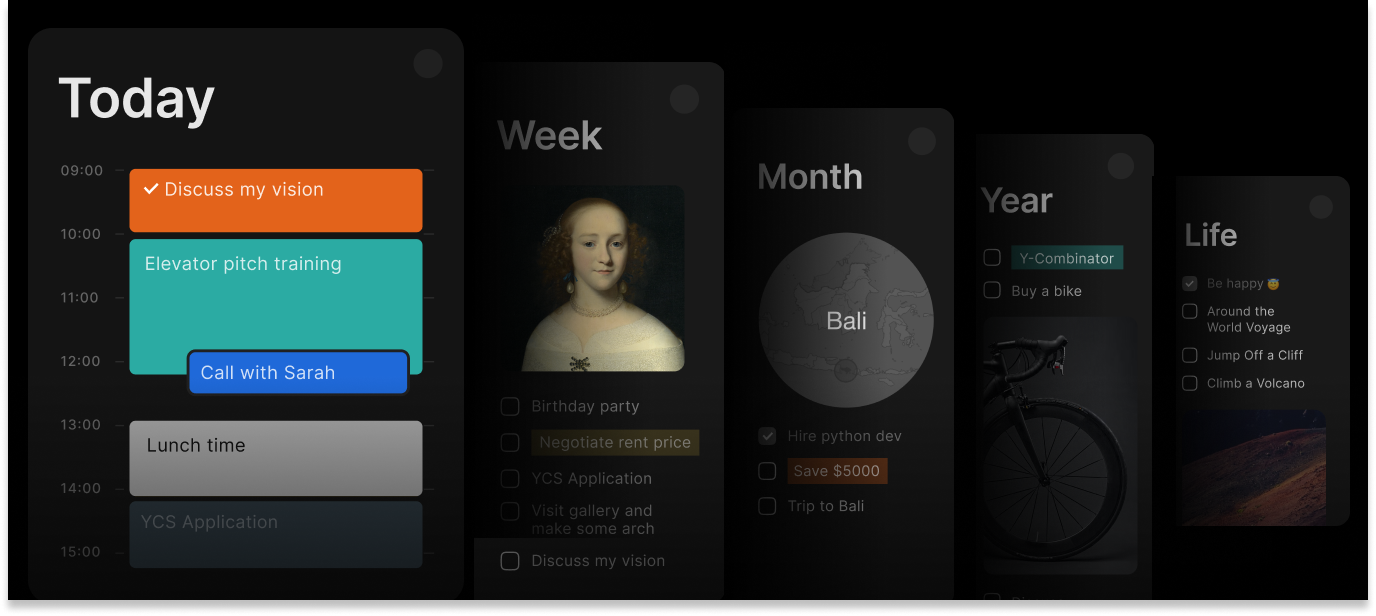
Timestripe is a goal-driven planning tool that helps individuals and teams structure their work by connecting daily tasks with long-term goals. It provides a unique perspective on time through Horizons, timelines, and a helicopter-view calendar, making strategic planning seamless.
Motion
Motion is an AI-powered productivity app that auto-schedules your day by intelligently placing tasks, meetings, and projects into your calendar, making it feel like you’re working with a personal assistant.
Task Management & Organization
Timestripe
Goal-Centric Approach. Tasks are connected to short and long-term goals for better strategic alignment
Horizons System. Plan work over different time periods (daily, weekly, monthly, yearly)
Timelines & Scheduling. Visualize tasks and milestones over time
Helicopter-View Calendar. Get a broad overview of tasks while keeping an eye on upcoming deadlines
Filters, Tags & Sorting. Organize work efficiently with smart categorization tools
Google chrome extension. For quick access to app in browser you can use extension plus it allows quick adding highlighted text from websites straight to a goal.
Helicopter-View Calendar. Plan tasks ahead while keeping a broad perspective
Smart Organization. Use tags, filters, and sorting to categorize and prioritize tasks efficiently. Also use shortcuts to make less clicks to save time
Motion
Schedule tasks. Leverages AI to schedule tasks based on priorities, due dates, and estimated durations
Define free time. Allows you to define time windows for tasks, and the AI will choose optimal slots
Recurring Tasks. Supports tasks (daily, weekly, quarterly) that the AI will auto-place
Improve flexibility. Tasks are dynamically reshuffled as your calendar changes, helping you stay flexible
Collaboration Features
Timestripe
Spaces. Dedicated workspaces for teams to collaborate on shared tasks and goals.
Task Assignment. Assign tasks to team members and track responsibilities.
Progress Center. Monitor updates, changes, and progress in one place.
Comments & Discussions. Keep conversations focused on specific tasks.
Motion
Team plan. Supports a team plan that allows task assignment and shared projects
Smart schedule. Automatically reschedules tasks when team members’ availability or priorities shift
Links for meetings. Lets you set up one-on-one or group meeting booking links built around your availability
Real time sync on devices. Provides real-time syncing across desktop and mobile, making sure all team members stay aligned
Overview
Timestripe
Minimalist, clean interface designed for clarity and long-term thinking. Emphasizes goal alignment, with visual planning tools that help you zoom in and out of different time horizons.
Motion
More complex UI, reflecting its power: calendar, project views, task details, and AI controls. Focused on automation: once set up, much of the scheduling is handled for you, but there is still the ability to drag tasks manually.
Unique Features
Timestripe
Horizons. View tasks in different timeframes for better planning.
Helicopter-View Calendar. See the big picture while managing daily tasks.
Goal-Oriented Structure. Every task contributes to a larger life goal.
Team view. Allows you to see what tasks every member has been assigned for on one screen.
Motion
AI Task Manager. Automatically schedules tasks intelligently based on deadlines, estimated durations, and priorities.
Dynamic Rescheduling. Moves tasks around when plans change.
Smart Calendar Integration. Works deeply with Google Calendar, Outlook, and more.
Booking Links / Meeting Assistant. Share your availability, and Motion handles meeting scheduling.
Templates & Views. Supports Kanban, list, and project templates to adapt to your workflow.
Pricing
Timestripe
Free Plan. Includes basic task management, goal setting, and limited lists.
Pro Plan. $9/month, which unlocks premium features like unlimited lists, up to 100 MB per file and rich customization.
5-Year Plan. This plan is $6.5/month, user saves 67% in the end.
P.S. You can get 50% off with our Get a Discount program.
Motion
No Free Plan. Has a 7-day trial to give a try.
Individual Plan. $19/month when billed annually ($34 month-to-month)
Team Plan. From $12/month per user when billed annually.
Best For
Timestripe
If you want a minimalist yet powerful planning system that connects daily productivity with long-term goals, both personal and team vectors, Timestripe is an excellent choice. Its intuitive Horizons, timelines, and goal-centric design make it unique among task management tools.
Motion
Motion, on the other hand, is built for users who want AI to take over their schedule, handling both meetings and tasks intelligently — ideal for busy bees who are okay with letting go of manual planning.
Read next